43,3725$% 0.25
51,3279€% 0.73
59,2261£% 1.15
6.944,72%1,57
11.526,00%1,73
45.964,00%1,73
4.981,73%1,34
12.992,71%1,10
฿%
Ł%
Ξ%
%
$%
02:00
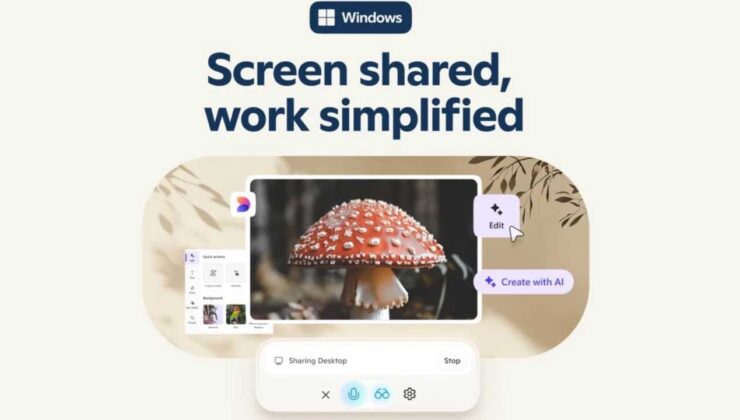
Microsoft has unveiled an innovative addition to its Copilot application for Windows 10 and Windows 11 users: Copilot Vision. This cutting-edge feature empowers AI to visually interpret the content displayed on your screen, offering detailed insights, contextual support, and analytical assistance tailored to your current activity. Microsoft describes this advancement as providing users with “a second set of eyes,” enhancing the way you interact with your digital environment.
One of the standout capabilities of Copilot Vision is its ability to operate concurrently across multiple applications. This means you can effortlessly switch between different programs—such as a video editor and a photo viewer—without losing the AI’s contextual guidance. Additionally, the “Highlights” feature allows you to request step-by-step instructions for specific tasks directly within your workflow. For example, you can ask how to crop a video in Clipchamp or remove an object in the Photos app, and receive comprehensive guidance without leaving your current application.
Note: Activation of Copilot Vision does not necessitate a subscription to Copilot Pro. Simply enabling the feature grants you access to its powerful AI-driven visual assistance capabilities.
Microsoft is committed to safeguarding user privacy with this new feature. Copilot Vision operates strictly with your explicit consent, ensuring it doesn’t activate automatically without your approval. This cautious approach reflects Microsoft’s heightened awareness and response to privacy concerns, especially following the discussions surrounding data recall issues earlier in 2024.
Initially launched for Windows 10 and Windows 11 users in the United States, Copilot Vision is currently accessible within these regions. However, Microsoft has announced plans to roll out the feature to other regions outside Europe in the near future. Following extensive testing within the Windows Insider program over several weeks, the feature is now ready for a broader audience. For more detailed information, you can visit Microsoft’s official blog post.
Comprehensive Guide: How to Format Windows 7, 10, and 11 Effectively
1
Evaluating Trust: Are Employees Reliable with Artificial Intelligence?
328 kez okundu
2
Innovative 14-Year-Old Develops Early Heart Disease Detection App
273 kez okundu
3
Discover AI Videos with Google Veo 3: Launches in New Countries Featuring Ultra Subscription and Enhanced Security
262 kez okundu
4
Hollywood Gets a New AI Twist: OpenAI’s Movie Featuring Sam Altman in the Spotlight
233 kez okundu
5
Samsung’s Galaxy S26 Could Disrupt Google: A Major Industry Shakeup
157 kez okundu